
Winlator
Imagine having a device but wishing to enjoy another operating system. Or maybe you want to play classic PC games on your mobile. Winlator APK lets you run Windows apps and games on your Android device.
| Name | Winlator APK |
| Latest Version | 10.1 |
| Size | 140 MB |
| Update on | 1 Hour Ago |
| Compatible with | Android 8.0+ |
| Price | Free |
| Developer | BrunoSX |
What Is Winlator APK:
Winlator APK is an Android compatibility layer and emulator. It can emulate the operating system of one architecture on another computer architecture. In simple terms, Winlator is like a miniature Windows PC on your Android device.
Key Features of Winlator APK:
- Relive classic games
For many born in the ’80s and ’90s, classic PC games are unforgettable. Games like Red Alert, Age of Empires, Command & Conquer, and Heroes of Might and Magic leave a lasting impression. Winlator APK allows you to relive these classics anytime on your mobile phone. - Run special software
Some software might only work on Windows. There may not be good options for Android. With it, you can easily run these applications. - Mobile office
Winlator APK offers a complete Windows desktop experience. You can use it for PDF editing, graphic design, and financial software, letting you do your work right from your mobile phone.
Cons:
- Performance depends on the device
Hardware acceleration works well, but the Winlator APK’s performance depends on your Android device. A device with low performance struggles to run many modern PC games. In contrast, a flagship device offers near-native smoothness. - Requires a technical threshold
For novice users, installing and configuring the Winlator APK can be difficult. You need some skill and knowledge to download the image, install drivers, and adjust settings. - Stability needs improvement
It runs a full operating system on a mobile phone, the virtual machine can crash or slow down. This may happen due to not enough resources, compatibility issues, or software conflicts. - Not all software runs perfectly
Some software or games might not start correctly. They can also have display problems or missing functions in the Winlator APK. - Game Control Experience Limited
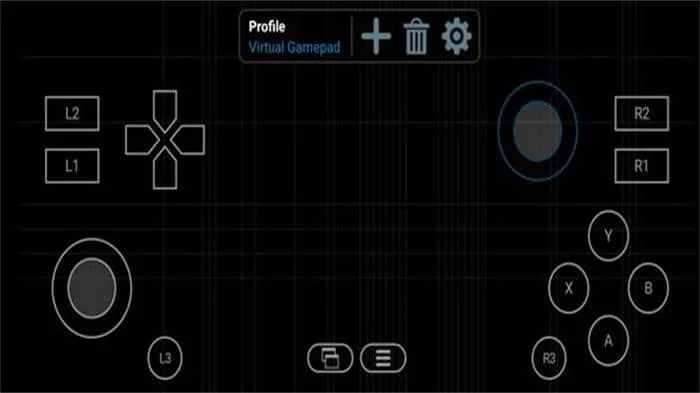
For games requiring keyboard and mouse actions, using virtual keys or external devices is not as good as direct control on a PC.
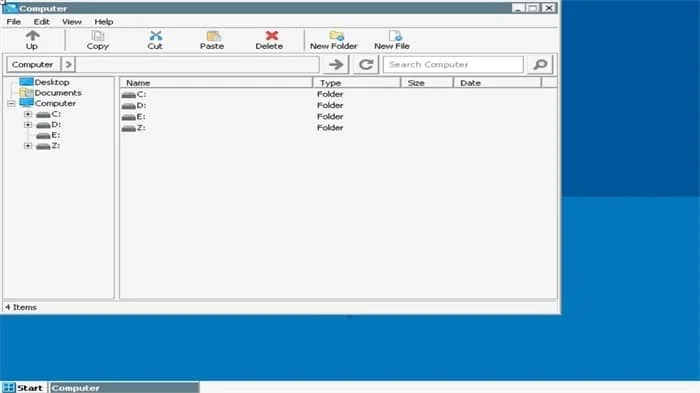
Winlator APK Screenshots:
Tips for Using Winlator APK:
- Choose the right architecture to reduce crashes
Choose x86 for 32-bit programs and x64 for 64-bit ones. Picking the wrong option may cause problems. - Make good use of the file management features
Use Winlator APK’s file manager to move game installers and save files to the virtual machine. This way, you can avoid complex command lines. - Allocate memory reasonably
More memory allocation is not necessarily better. For a phone with 4GB of memory, divide most of 2GB to the Winlator APK, allocating more can cause the phone to lag. For a phone with 2GB of memory, it is advised not to use Winlator APK, as it is prone to crashes.
About Winlator:
Winlator lets you run Windows apps and games on Android phones or tablets. It’s not a remote desktop or cloud computer. It creates a local environment on your device. This environment runs Windows programs.
Benefits of Using Winlator APK:
- Built-in hardware acceleration support
Supports GPU hardware acceleration, providing smoother gaming frame rates and better graphical performance. - Highly integrated
It perfectly integrates components such as Wine, Box86/Box64, and graphic drivers. With the Winlator APK, you no longer have to download and set up those tricky dependencies. - Customizable network configuration
Supports various network modes, like bridge and NAT networks, to
make it simple for virtual machines to connect to the internet. - Convenient freedom
Winlator APK brings Windows apps and games to your pocket. You can enjoy a PC experience anytime and anywhere. - Mouse mode switching
Offers a virtual mouse, and you can easily switch between full-screen and windowed mode.
How To Install Winlator APK:
- Download the latest version of Winlator APK from this website.
- Download the corresponding OBB data package file.
- In your Android device, go to Settings > Security. Then, allow your file manager to install apps from unknown sources.
- Use a file manager to locate the downloaded Winlator APK file and click on it to start the installation.
- After installation is complete, do not open the app immediately. Move the downloaded OBB file using a file manager. Please place it in this path: Android/obb/com.winlator/. If the com.winlator folder isn’t there, create it yourself.
- Launch the Winlator APK. On the first run, it will load the OBB file and initialize.
Frequently Asked Questions About Winlator APK:
- Is the Winlator APK free?
Yes, Winlator APK is an application based on an open-source project that you can download and use for free. - What is an OBB file? Do I have to download it?
The OBB file is an expansion package for Android apps. It holds the essential environment files needed for the Winlator APK to function. Download it and put it in the right folder. If you don’t, the application won’t start. - What should I do if the application performs poorly?
Change the presets for Box86/Box64 in the settings. Switch from default to intermediate or advanced. - Can I install other Android applications in the Winlator APK?
Winlator APK simulates Windows, but it doesn’t support installing Android apps directly. First, install an Android emulator on a virtual machine. Then, install Android apps in the emulator. - Why does my game have no sound?
Switch the DirectSound option to Native Windows in the DX Components settings.



Leave a Reply