

Ruffle Flash Emulator APK
One day, you find the beloved Gold Miner and Crazy Little Kid on your hard drive. But then, your browser tells you that Flash is no longer supported. The Ruffle Flash Emulator is like an old friend, it’s an open-source tool written in Rust to bring SWF files back to life on web pages. This way, classic Flash content can be enjoyed again.
| Name | Ruffle Flash Emulator |
| Size | 23 MB |
| Update on | 1 Hour Ago |
| Compatible with | Android 8.0+ |
| Price | Free |
What Is Ruffle Flash Emulator:
The Ruffle Flash Emulator is an Adobe Flash Player emulator written in Rust. It allows classic Flash content, such as web animations and mini-games, to run in browsers and operating systems.
Adobe stopped supporting Flash Player at the end of 2020. Now, many old web pages and Flash games have playback problems. With the Ruffle Emulator, you can replay this Flash content on modern browsers.
Key Features of Ruffle Flash Emulator:
- Revive Flash content
You can easily reopen and enjoy classic Flash games from your childhood. You can access interactive website animations, educational presentations, and older corporate demo files. - Access interactive content on old websites
Many older websites use Flash for navigation, charts, or interactive features. The Ruffle Flash Emulator can help you view this content correctly. - Run Flash safely on modern devices
Flash Player had many security problems. In contrast, the Ruffle Flash Emulator uses Rust and WASM for better security.
Cons:
- DRM content not supported
Commercial Flash videos protected by copyright cannot be played. - Some complex content has insufficient compatibility
Some Flash files with advanced ActionScript 3.0 code, 3D effects, or complex interactions may lag. They could also miss features or fail to run altogether. - FLV videos are not supported
The Ruffle Flash Emulator works mainly with .swf files. It can’t play FLV Flash videos directly. You need a special video player for those. - No offline caching function
Every time you open online Flash content, it must reload. There’s no caching system. Only .swf files saved locally can be accessed offline.
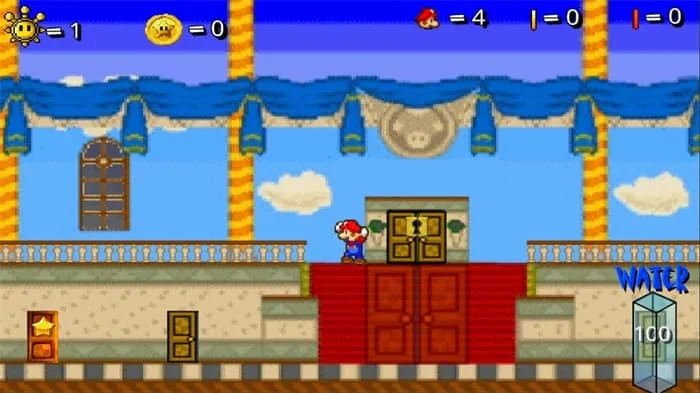
Ruffle Flash Emulator Screenshots:

Tips for Using Ruffle Flash Emulator:
- Prioritize the corresponding version
It is recommended to use the browser plugin version on the computer side for easier access to web Flash. If you need to open a large number of local .swf files, you can choose the desktop client. For mobile, use the APK version to meet mobile scenario needs. - Pay attention to performance optimization
Make sure your browser and device can handle big Flash games or complex animations. If you see low frame rates, try closing heavy apps. You can also adjust settings in the Ruffle Flash Emulator. For example, reduce the quality to make it smoother. - Test compatibility in advance
Test complex Flash files on your computer first. Mobile adaptation for such content is often low. - Use with tools
If you encounter FLV video files that cannot be opened, you can use tools like the VLC Player.
About Ruffle Flash Emulator APK:
Ruffle Flash Emulator APK is a Flash Player emulator written in Rust. It doesn’t use Adobe’s old Flash plugin. Instead, it runs SWF files directly in modern browsers using WebAssembly technology.
Benefits of Using Ruffle Flash Emulator APK:
- Greatest security
Ruffle Flash Emulator APK is built on Rust. It avoids many security issues in Flash Player. This includes memory problems and code injection to allow it to run Flash content safely on your device. - Smooth and effortless operation
Low hardware needs let even basic computers or old phones run small Flash games and animations smoothly. Loading speeds are quicker than with traditional Flash Player. - Strong cross-platform compatibility
Supports Windows 7 and above, Mac OS X 10.12+, and mainstream Linux distributions. Ruffle Flash Emulator APK runs on Android devices and modern browsers like Chrome, Firefox, and Edge. It covers most of the devices you use every day. - Simple and easy to use
The browser plugin version automatically detects .swf files after you install it. The client version lets you open files directly by dragging and dropping them. - Open-source and customizable
If you know how to code, you can change the source code to fit your needs. You can add custom features and adjust Flash content for special situations.
How To Use Ruffle Flash Emulator:
- Download the latest version of the Ruffle Flash Emulator APK from this website.
- In your Android settings, find the security or privacy option. This allows you to install apps from unknown sources.
- Locate the downloaded APK file and click on Install.
- After the installation is complete, find and open Ruffle in the app list.
- In the app, click to select a local SWF file, find the Flash file you want to play, and then click Open to run it.
Frequently Asked Questions About Ruffle Flash Emulator:
- Is the Ruffle Flash emulator safe?
Yes. Ruffle is safe. It’s open source, sandboxed, and blocks old Flash security issues. - Does Ruffle work on mobile?
Yes, Ruffle works on mobile. It’s great for Android browsers and apps. However, iOS support is limited because of Apple’s restrictions. - Does the Ruffle Flash Emulator support playing all Flash content?
The Ruffle Flash Emulator works well with most basic Flash animations and games. However, some content may not run perfectly. Some Flash content might still have compatibility issues. - Does it support the latest Flash version?
The Ruffle Flash Emulator works with different older versions of Flash Player. This includes ActionScript 1.0, 2.0, and 3.0. - Why is there an occasional lag?
Large or complex SWF files can slow down performance. So, it’s best to update your browser or simplify the file. - How to resolve the issue of not being able to play SWF files?
If the SWF won’t play, check if you have the latest Ruffle Flash Emulator. Older versions might have compatibility problems. Additionally, check if the SWF file is complete and not corrupted.







Leave a Reply