

RPCSX Emulator APK
RPCSX Emulator is an open-source emulator developed specifically for Android devices, aiming to bring the PlayStation 3 gaming experience to mobile phones. It is built on the RPCS3 desktop emulator and is officially named RPCSX-UI-Android. You can clearly feel that it not only retains RPCS3’s powerful core performance but also optimizes the interface for mobile screens and user habits.
| Name | RPCSX Emulator |
| Latest Version | 954 |
| Size | 191 MB |
| Update on | 1 Hour Ago |
| Compatible with | Android 5.0+ |
| Price | Free |
| Developer | James Hanseller Ltd. |
What Is RPCSX Emulator:
RPCSX Emulator lets users play PlayStation 3 games on Windows, Linux, and Android devices. It mimics the PS3 hardware in software. This lets games that only work on Sony consoles run smoothly on personal computers or Android devices. The RPCSX Emulator is a stand-in for a PS3 to let you play classic PS3 games on your mobile phone or tablet.
Key Features of RPCSX Emulator:
- Play PS3 games on Android devices
Relive classic PS3 games anytime, anywhere, without the need to purchase a PS3 console. - Experience HD graphics
The RPCSX Emulator supports HD graphics. This lets you enjoy the amazing visuals of PS3 games on your Android device. - Customize game settings
You can change the game’s resolution, frame rate, and other settings. - External controller support
The RPCSX Emulator works with external controllers, like Bluetooth gamepads. - Native Android UI
The user interface is designed for Android. It aims to match how people use mobile devices.
Cons:
- High performance requirements
The architecture of the PS3 is complex, and emulating it is extremely challenging. Therefore, the RPCSX Emulator has very high hardware performance requirements for Android devices. Even flagship phones can face problems. You might see lag, frame drops, or even severe heating. Excessive battery drain can happen, too, especially when playing large PS3 games. - Complex settings
For users new to emulators, the setup can be tricky. It involves installing firmware, mapping controllers, and adjusting performance settings. - Compatibility limitations
Not all PS3 games can run properly, some games may crash in specific scenarios. For games that utilize the PS3’s unique design, compatibility relies on the device’s specifications and Android versions. - Storage access restrictions
Storage limits on Android mean users can’t access save folders on many devices. This restriction makes it hard to back up and sync game progress.
RPCSX Emulator Screenshots:
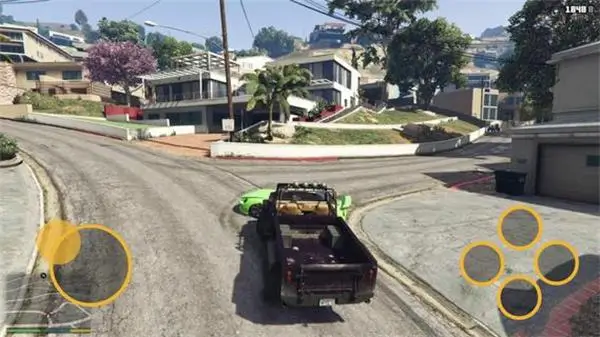
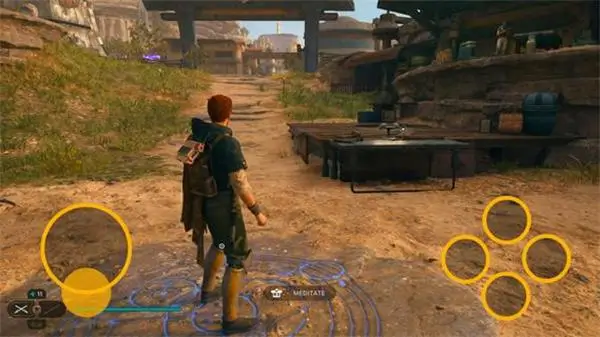
Tips for Using RPCSX Emulator:
- Get PS3 Firmware
RPCSX Emulator requires PS3 firmware to run games. - Check device temperature
Due to the high hardware requirements of PS3 emulation, devices may heat up. Check the device temperature often. Avoid letting it overheat for long. If it gets too hot, let it rest and cool down. - External physical controller
RPCSX Emulator supports virtual keys, but it’s best to use a Bluetooth controller. This gives you the best console gaming experience to provide more precise control and a more comfortable grip.
About RPCSX Emulator APK:
RPCSX Emulator APK is made to mimic the Sony PlayStation 3 console. It lets users play PS3 games on their computer or Android devices. This creates a virtual space for players who don’t have a PS3 to enjoy these games.
Benefits of Using RPCSX Emulator APK:
- Strong compatibility
The RPCSX emulator has a compatibility rate of over 85%, capable of running thousands of PS3 games. - Abundant customization options
You can control the rendering resolution, shader settings, audio delay, aspect ratio, screen scaling, and touch screen overlay layout. - Multi-format game support
Supports different PS3 game formats. The includes PKG/RAP formats, decrypted ISOs, and folders. Users get flexible options for game resources. - Quick save states
Offers fast save and load functions. Players can save their games anytime. - Controller customization
Supports virtual buttons and physical controllers. Users can customize the size and position of on-screen buttons.
How To Install RPCSX Emulator APK:
- Download the latest version of the RPCSX Emulator APK from this website.
- After the download is complete, open the device settings, find the security option, enable installation permissions from unknown sources, then open the file manager, locate the downloaded RPCSX Emulator APK file, click install, and wait for the installation to complete.
- Download the PS3 system firmware from the official website or a reliable source.
- Open RPCSX, navigate to the settings or firmware installation section, select the .pup file, and click install.
- Add a PS3 game ISO or folder to the emulator game library.
- Start the game.
Frequently Asked Questions About RPCSX Emulator:
- Is RPCSX a PS3 emulator?
Yes, RPCSX is a PS3 emulator for Android. It lets you play PlayStation 3 games on your phone or tablet. - What game formats are supported by RPCSX?
Supports ISO, PKG, RAP formats, and other compressed formats. - How do I import PS3 firmware?
Download the PS3 firmware file PS3UPDAT.PUP. Then, install it in the emulator’s settings. - Why do I need to install firmware after installing the RPCSX Emulator APK?
The emulator cannot contain Sony’s proprietary firmware. Users must download the PS3 firmware from the PlayStation website. Then, they should install it in the emulator. - What should I do if the game does not run after installing the APK?
Ensure that you correctly install the PS3 firmware. Then, check if the game files are complete and compatible.




Leave a Reply