

Limbo Emulator APK
Have you ever thought about how great it would be to play computer games or work on your Android device? Imagine running Windows 98, Windows XP, and different Linux distributions on your device. That’s the amazing experience Limbo Emulator offers.
| Name | Limbo Emulator |
| Latest Version | 2.10.0-x86 |
| Size | 8.51 MB |
| Update on | 1 Hour Ago |
| Compatible with | Android 4.2+ |
| Price | Free |
| Developer | EnergyCube |
What Is Limbo Emulator:
Limbo Emulator is an Android emulator using QEMU technology. It is made for mobile devices and lets you run x86 operating systems on non-x86 Android devices. It translates instruction sets for cross-platform compatibility. This lets users enjoy a PC system on their Android phones.
Key Features of Limbo Emulator:
- Experience classic operating systems
The Limbo PC Emulator lets you run classic operating systems, such as Windows 95 and Windows XP. You can experience the old interface and operating logic. Plus, you can run classic games or apps from that time on your phone. - Run specific desktop applications
Limbo Emulator has limited performance but can run some lightweight desktop apps. This includes some DOS programs, early Windows tools, and certain Linux command-line tools. - System testing and development on mobile
You can use Limbo Emulator to create a virtual testing environment on mobile devices. Test the performance of different Linux distributions with specific settings. Also, check the compatibility of lightweight desktop applications.
Cons:
- Slow running speed
Mobile devices have limited CPU and memory. Because of this, running desktop operating systems with the QEMU emulator is slow. Many instructions need translation, and resources need simulation. This slows things down further. - High resource consumption
Running a virtual machine uses a lot of system resources. This includes CPU, memory, and storage space. Running the Limbo Emulator on low-end or mid-range Android devices can cause overheating and drain the battery quickly. - Compatibility issues
Not all desktop operating systems run smoothly. Also, some devices struggle to start the virtual machine. Hardware emulation can be tricky. You might face issues like driver incompatibility, missing features, or even system crashes. Settings may need to be repeatedly adjusted under different mobile hardware configurations. - Complex operation
For users new to virtual machines, setting up the Limbo Emulator can be tricky. You must manually set parameters like CPU, memory, and hard disk images. Then, find and load the specific operating system image files. - Does not support modern software
Limbo PC Emulator can’t run modern desktop apps or big games. This is because of performance limits and the emulation environment’s features.
Limbo Emulator Screenshots:
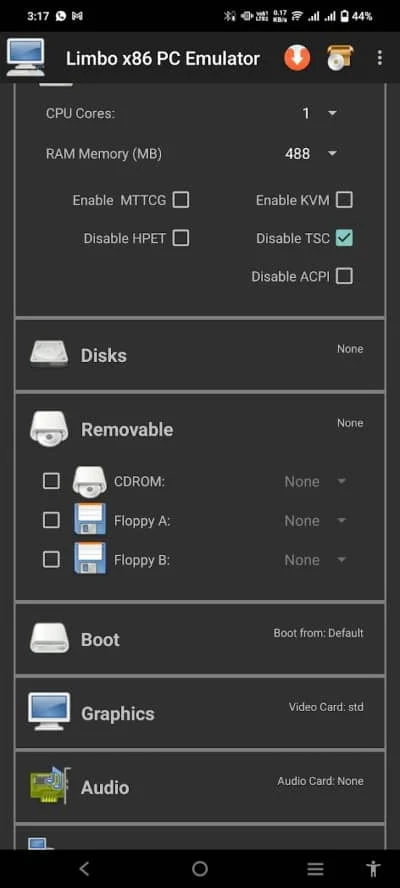
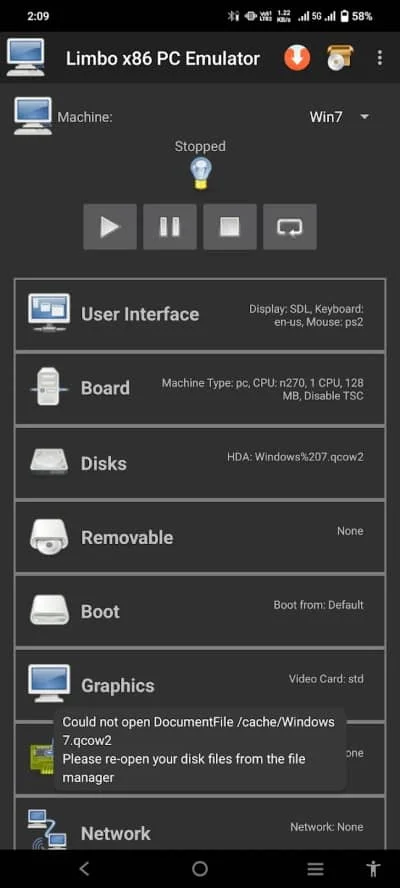
Tips for Using Limbo Emulator:
- Choose a lightweight operating system
Due to mobile device limits, it’s best to pick an operating system that uses fewer resources. For example, Windows 95/98, Windows XP Lite, and various lightweight Linux distributions are good choices. - Prepare a suitable disk image
You need a virtual disk image file pre-installed with the operating system. These image files can be found online or created by yourself using the QEMU tool. Ensure the image file is ready for the x86 architecture. Keep its size moderate to save storage space. - For experimental use only
The Limbo Emulator is not suitable for running complex software or large games. - Ensure there is enough available space
Operating system image files are big and can use a lot of space on your phone. Make sure you have enough free space.
About Limbo Emulator APK:
Limbo Emulator APK lets users run different operating systems and apps on Android devices. In short, it makes your Android phone or tablet a portable computer. You can use it to simulate a full desktop-level environment.
It brings Quick Emulator to Android, turning your Android phone into a mini-computer. You can run different systems, like Windows and Linux.
Benefits of Using Limbo Emulator APK:
- Support for multiple operating systems
Limbo Emulator, built on QEMU, runs many operating systems. It supports Windows, several Linux distributions, and Android-x86. - Lightweight design
It uses fewer resources than traditional virtual machines. This makes it great for mobile devices. - Offline computing environment
You can do tasks like text processing and programming in a local Linux environment. This doesn’t need an internet connection. - Optimized for Android
Limbo Emulator is based on QEMU but made for Android. This means it runs well on mobile devices. It combines advanced virtualization technology into an Android app. - Configurable
You can adjust many settings of the virtual machine to match your needs and optimize its performance on your device. This includes CPU type, memory size, hard disk path, display mode, network settings, and more.
How To Install Limbo Emulator APK:
- Download Limbo Emulator APK from this page.
- Once the download finishes, go to your device settings. Find the security option. Enable installation permissions from unknown sources.
- Download the system image file you want to run.
- Open Limbo Emulator and click Load Machine to create a new virtual machine.
- Set CPU, memory, hard disk, and image path in the user interface.
- Click Start to launch the virtual machine. Then, enjoy the computer system on your Android device.
Frequently Asked Questions About Limbo Emulator:
- Can I play large PC games on the Limbo Emulator?
No. The Limbo Emulator’s performance is limited, it can’t handle modern, large PC games. It’s better for running classic small games from the DOS era or light casual games from Windows 95/XP. - Which operating systems can the Limbo Emulator run?
It can run various operating systems, including Windows, Linux, FreeDOS, etc. - Why is running Windows so sluggish?
Most Android devices don’t have KVM acceleration. So, QEMU’s software simulation of the x86 instruction set is slow and inefficient. Also, the performance of the emulated graphics card is very limited.





Leave a Reply