
Citra Emulator APK
I’ve used quite a few emulators, but the Citra Emulator feels particularly different to me. It doesn’t transfer 3DS games to a computer or smartphone. Instead, it simulates the 3DS hardware and system environment. It lets me run games that were only playable on the handheld device smoothly on my home setup.
| Name | Citra 3DS Emulator |
| Latest Version | 518f723 |
| Size | 3.48 MB |
| Update on | 1 Hour Ago |
| Compatible with | Android 9.0 |
| Price | Free |
| Developer | PabloMK7 |
What Is Citra Emulator:
Citra Emulator is an open-source tool. It lets players run Nintendo 3DS games on Windows, macOS, Linux, and Android. With Citra, you can enjoy many classic 3DS games without needing the actual device.
Key Features of Citra Emulator:
- Break through hardware limitations and relive classic games
Many 3DS devices may be old, damaged, or unable to play overseas games due to regional limits. Citra Emulator allows players to enjoy these games again on computers and mobile devices. You don’t need the original hardware. - Enhance the gaming experience, optimize graphics and controls
The 3DS has a low resolution. This causes blurry display effects on today’s large-screen devices. Citra Emulator’s resolution enhancement feature boosts image quality. It also supports anti-aliasing, texture filtering, and more effects. It works with external PS5 and Xbox controllers. You can use custom touchscreen buttons, too. - Convenient save files
Citra Emulator lets players save instantly and export/import save files. This makes it easy to share completion saves or try out others’ completion saves. The helps prevent losing saves if the 3DS cartridge is misplaced.
Cons:
- Strong performance dependency
The Citra Emulator must convert 3DS ARM instructions into PC x86 instructions in real-time. This puts a heavy strain on the CPU’s single-core performance. Even with a multi-core processor, your computer can still lag in big 3D games. This happens if the single-core frequency isn’t high enough. - Not 100% compatible
Citra 3DS Emulator has a big game compatibility list. Still, some games have graphical errors, sound issues, or will not run at all. It is best to check the compatibility rating before playing a specific game. - Has set up thresholds
For beginners, dumping system files and games from the 3DS can be tricky. It needs some technical know-how and a bit of patience.
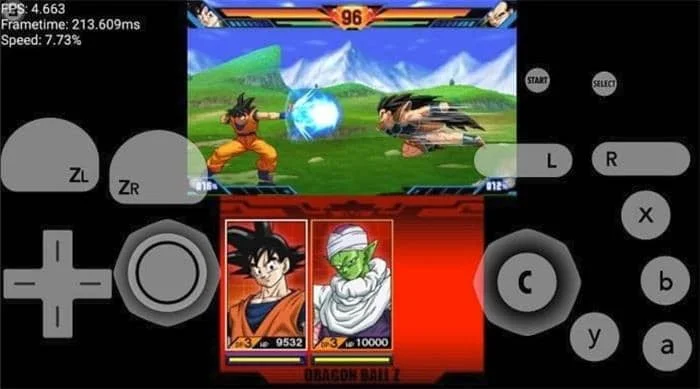
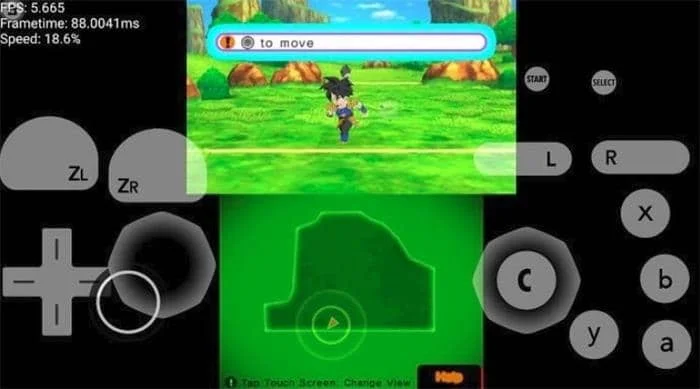
Citra Emulator Screenshots:
Tips for Using Citra Emulator:
- Get game ROMs legally
Make sure to get game ROMs legally. You can export them from your own 3DS cartridge. This helps you avoid copyright problems. - Check system requirements
Make sure your PC or Android device meets Citra Emulator’s minimum system requirements. Pay special attention to CPU performance. - Adjust graphics settings based on device configuration
Low-performance devices should turn off 4K rendering and anti-aliasing. They can also enable performance mode. High-performance devices can max out graphics settings, but they need to cool effectively. - Use external controllers
It is strongly recommended to use an external game controller for gaming. - Backup saved files
Regularly back up your game saves to prevent data loss.
About Citra Emulator APK:
Citra Emulator APK lets you play Nintendo 3DS games on your device. It creates a virtual 3DS environment, so you don’t need a physical console. You can enjoy high-definition graphics and adjust settings. It supports keyboard and gamepad controls. You can also change games and play online with others. In other words, Citra 3DS Emulator is not a console, but it gives computers and mobile devices the ability to run 3DS games.
Benefits of Using Citra Emulator APK:
- Strong compatibility, supporting a vast number of 3DS games
Citra Emulator APK works with over 90% of popular 3DS games. This includes Pokémon XY, Sun/Moon, Mario Kart 7, and Animal Crossing: New Leaf. All of these run smoothly and support Chinese-localized versions of games. - Custom controls
Supports keyboard, mouse, and popular game controllers. Players can easily map keys for a comfortable experience. - Graphics experience beyond the original machine
The original 3DS is limited by hardware capabilities, with a low screen resolution. Citra Emulator APK lets users boost game rendering resolution significantly, even reaching 4K. - Enhanced features
It has features that the original device lacks. These include instant save, acceleration, and cheat codes. - Instant save
You can save and load your game progress anytime and anywhere. There’s no need to depend on in-game save points. - MOD support
Players can use cheat codes. These let them change game settings. They can also load community-made mods to improve gameplay.
How To Install Citra Emulator APK:
- Before installing, make sure your Android device allows installation from unknown sources.
- Go to Settings > Security > Enable Install unknown apps for your browser or file manager app.
- Download the Citra Emulator APK file to your device.
- Open your file manager. Find the downloaded APK file. Tap it to begin the installation.
- Once installed, open Citra Emulator. You’ll need to set up user folders. Then, choose your game storage folder and allow file access permissions.
- Prepare your Nintendo 3DS game ROMs in a designated folder on your device.
- In the emulator, navigate to the game folder to load and play your games.
Frequently Asked Questions About Citra Emulator:
- What replaced the Citra Emulator?
The Citra Emulator is now replaced by Azahar. This new open-source 3DS emulator comes from forks of Citra and Lime3DS. Azahar boosts performance and game compatibility. It is now the top choice after Citra Emulator shut down. - Is the Citra 3DS emulator legal?
The Citra Emulator is legal, but using it with unauthorized game ROMs is often illegal. - Why was Citra shut down?
Citra shut down because of legal pressure from Nintendo. This followed a lawsuit against related emulator projects. - Is the Citra Emulator free?
Yes, Citra is completely free and open source. - Why can’t I play games after installing the Citra Emulator APK?
It could be because your phone doesn’t have enough specs, or the game files aren’t loading properly. The Android version has higher requirements for phone CPUs and GPUs. - Can Citra Emulator run all 3DS games?
No, most games are well compatible currently, but some games still have bugs or cannot start. - How do I import game ROMs?
You can directly load .3DS/.CIA/.CCI game files or add a game directory.

Leave a Reply