

Boxvidra Emulator APK
Boxvidra Emulator can make your Android device a virtual Windows PC. You can tackle Windows tasks and enjoy PC games anytime and anywhere. There’s no need for a heavy laptop.
| Name | Boxvidra Emulator |
| Compatible with | Android 5.0+ |
| Price | Free |
What Is a Boxvidra Emulator:
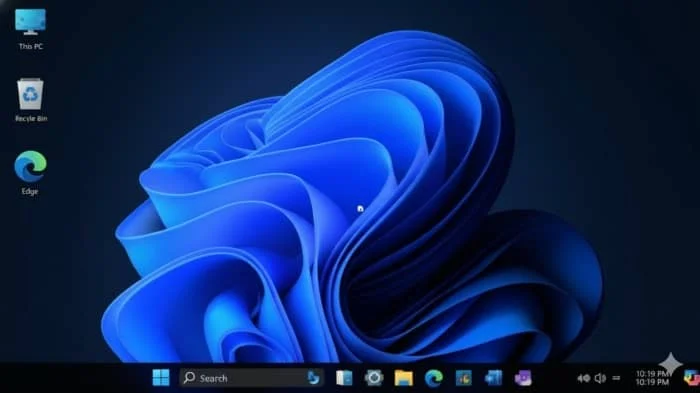
Boxvidra Emulator is a Windows emulator for Android devices. It simulates a full Windows operating system. With it, you can run Windows programs and games that usually need a PC right on your Android phone or tablet.
Key Features of Boxvidra Emulator:
- Running Windows applications
You can use different Windows-only software on Android devices. This includes the Microsoft Office suite, Photoshop, and other professional tools. Some niche apps are also available only for Windows. - Play PC games
Boxvidra Emulator lets you play classic PC games and big 3D games that won’t run on Android. - Mobile office
Manage office tasks that require a Windows setup directly on your phone or tablet. This way, you will not have to carry a laptop, making mobile work even more flexible. - Development and testing
For developers, Boxvidra Emulator tests how well Windows apps run on Android devices. It can also handle light development tasks.
Cons:
- Strong dependence on device performance
Performance depends on device hardware. Lower-end devices may struggle to run some demanding games smoothly. - Complicated installation configuration
Boxvidra Emulator offers a one-click installation script. However, you must finish the installation in the Termux terminal. This can be tricky for regular users. The installation time is also relatively long. - High resource consumption
Running a full desktop environment on a phone significantly increases the system load. Boxvidra Emulator uses a lot of CPU, memory, and battery power. If you use it for a long time, your device might overheat, and the battery could drain quickly.
Boxvidra Emulator Screenshots:

Tips for Using Boxvidra Emulator:
- Ensure the device meets the requirements
Check if your Android device meets the minimum specifications before installation. - Choose the correct running mode
Start with lightweight mode or application mode the first time you use it. These modes use fewer resources and run more smoothly. If the device performance is enough, try the desktop mode for full functionality. Boxvidra Emulator’s key performance indicators change with different modes. You can adjust them based on your needs. - Pay attention to performance monitoring
Boxvidra Emulator includes a simple performance HUD. You can see CPU and GPU usage, along with the frame rate, in real-time. If a resource is overused and causing lag, close unnecessary background programs or lower the running mode.
About Boxvidra Emulator APK:
Boxvidra Emulator APK is made for Windows and macOS. It uses Box86 and Box64 technologies. This tool lets users access a full Windows desktop on their Android devices. They can manage files, browse the web, use office software, and run PC applications and games.
Benefits of Using Boxvidra Emulator APK:
- Comprehensive features, realistic PC experience
Boxvidra Emulator APK offers a full desktop environment and app ecosystem. It includes a built-in browser, office suite, media player, and more. You can also install various Linux and Windows programs. Users can have a PC-like experience on their phones. Many traditional Android emulators can’t provide this. - Strong compatibility
With Box86 and Box64, Boxvidra can run many apps and games made for desktop systems. You can run 32-bit and 64-bit Windows programs in the Boxvidra Emulator APK, but only if Wine supports them. - Installation and usage are relatively simple
It offers a simple one-click installation. Users can just paste a command in Termux. This action sets up the whole environment automatically. - Multi-mode support
Boxvidra Emulator APK is designed for mobile use. It offers three modes: mode, application mode, and streamlined mode. These options help balance performance and functionality. Choose a mode based on your device. Use high-performance mode for near-native smoothness. Switch to streamlined mode to save resources and boost stability.
How To Install Boxvidra Emulator?
- Install Termux on your Android device.
- Once the installation is complete, open Termux, which has a black terminal interface.
- Install Termux-X11.
- In Termux, type termux-x11:1 and press Enter to start the X11 service. A XServer interface or prompt will pop up on the screen, keep it running in the background.
- In Termux, run this command to download the Boxvidra installation script: curl -s -o ~/x https://raw.githubusercontent.com/Chrisklucik0/BOXVIDRA-EMULATOR/main/install && . ~/x
- Continue to execute in Termux: bash ~/boxvidra-install.sh.
- Type Boxvidra in Termux and press Enter to start the Boxvidra Emulator.
Frequently Asked Questions About Boxvidra Emulator:
- What games and software can run on the Boxvidra Emulator?
It works with most Linux apps and some Windows programs. This includes Linux Steam games and a few Windows games. However, some high-end games might have limited compatibility. - Can all apps run after installing the Boxvidra Emulator APK?
Most applications and games can run, but some high-performance games may have limitations. - Does the Boxvidra Emulator have high requirements for computer configuration?
A computer with medium specs or better is usually needed. It’s best to have at least 8 GB of RAM and a dedicated graphics card.



Leave a Reply